
Background Agents (Beta)
OVERVIEW
Background Agents is Loop's AI-powered returns automation feature that proactively reviews your returns queue on a schedule and recommends — or takes — actions based on your merchant instructions and multiple return signals. This article explains what Background Agents does, how to access Recommended actions in Loop Admin, how to configure merchant instructions, and how to use run and dismiss feedback to improve future recommendations. Use the menu on the left to quickly navigate this article.
What it is
Background Agents are AI-powered agents that run on a schedule inside Loop Admin, evaluating open returns holistically and proposing or taking actions with full reasoning transparency. Unlike rules-based Workflows — which apply deterministic if/then logic — Background Agents weigh multiple signals at once: customer lifetime value, product return rates, shipping and disposition state, and your merchant instructions. Every recommendation includes a confidence indicator and a plain-language explanation of why the action was proposed.
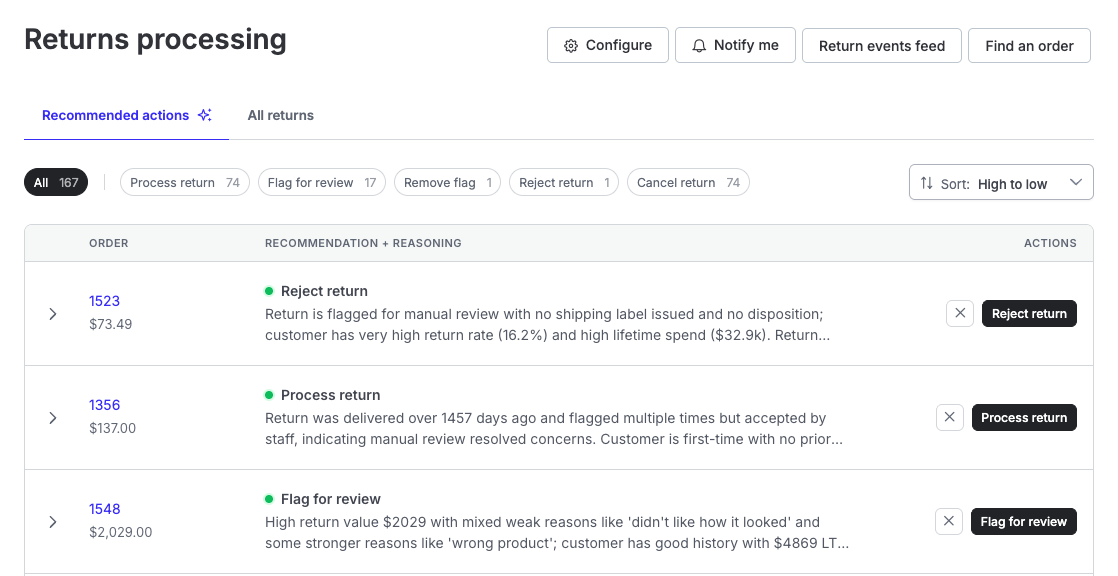
Background Agents live in the Return processing section of Loop Admin. When enabled, a Recommended actions tab appears alongside All returns.
Why it matters
Reduce repetitive manual triage time without losing visibility or control
Standardize review logic across your CX team using merchant instructions
Understand every AI decision — full reasoning is surfaced per recommendation
Build trust gradually: review and approve recommendations before any automation runs
Improve agent quality over time by providing run/dismiss feedback
How it works
Background Agents run on a set schedule. The currently available agent is the Returns Queue Manager, which runs every hour and evaluates open, review, and processing returns using customer history, product context, shipping and disposition signals, and your merchant instructions.
For each return it evaluates, the agent proposes one of the following actions: Process return, Flag for review, Remove flag, Reject return, or Cancel return. You can filter the table by action type using the chips above the recommendations list. You can approve any recommendation (Run) or reject it (Dismiss) — with an optional reason that improves future suggestions.
Understanding confidence levels
Each recommendation displays a colored dot indicating the agent's confidence in the proposed action:
🟢 Green — High confidence
🟠 Orange — Medium confidence
🔴 Red — Low confidence
Higher-confidence recommendations are generally safer to run without further review. For low-confidence recommendations, expand the row and review the full reasoning before acting.
How Background Agents differs from other Loop AI features:
Feature | When it runs | Decision type | Example |
|---|---|---|---|
Workflows | Return lifecycle events | Deterministic if/then rules | "Auto-keep items under $20" |
Loop Assistant | When you open chat | Conversational, on-demand | "Show me flagged returns and help me process them" |
Background Agents | Scheduled intervals | Holistic reasoning across signals | "This customer has 4 returns in 90 days, but 3 were the same defective SKU — process, don't flag" |
Workflows always run first. Background Agents see what workflows have already decided and do not duplicate or contradict them.
Note: Background Agents is currently in Early Access. Contact your Merchant Success Manager to request access.
Setup
Follow the steps below to get started with Background Agents.
Step 1: Access Recommended actions
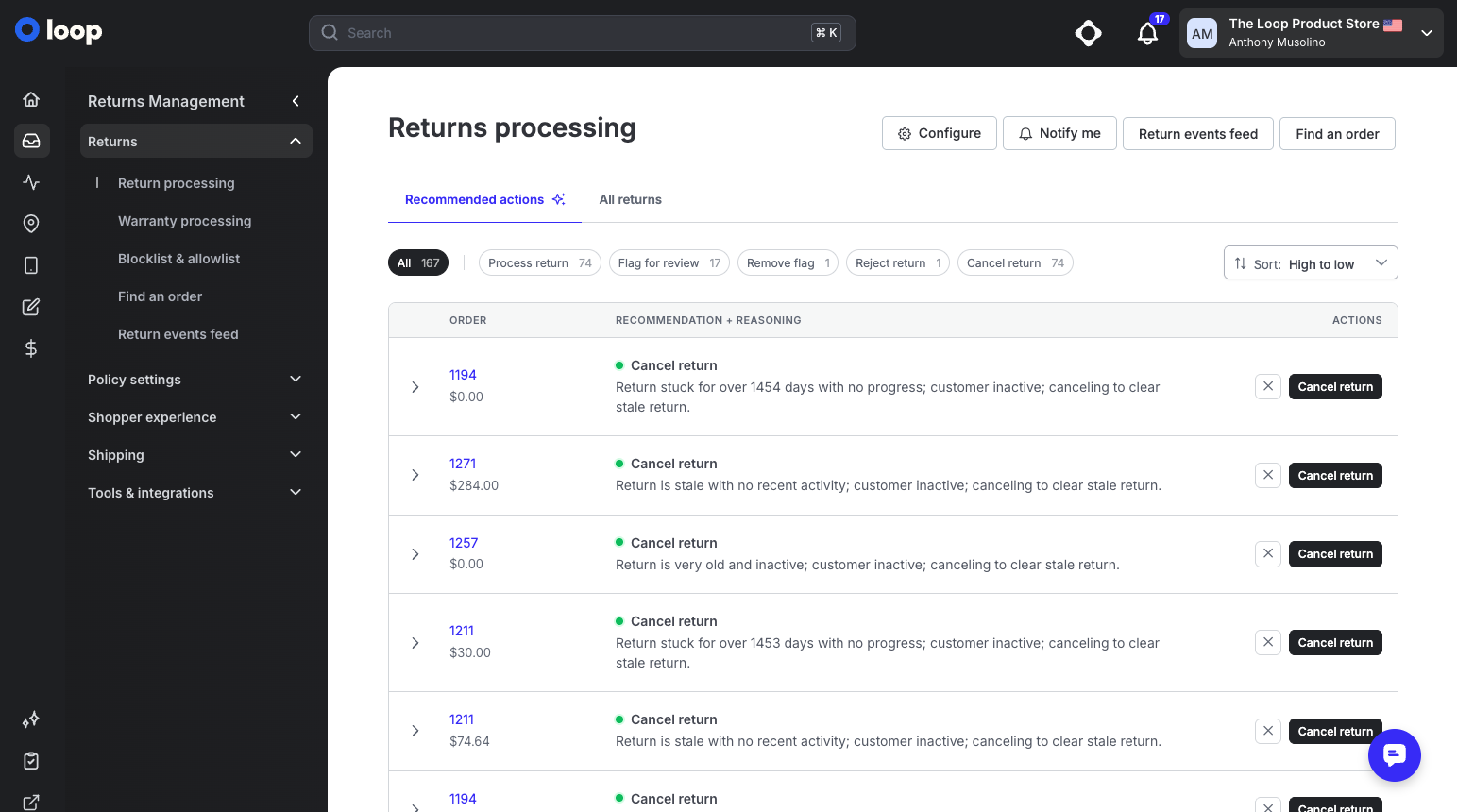
In Loop Admin, navigate to Returns > Return processing. When Background Agents is enabled for your shop, you'll see two tabs: Recommended actions and All returns. Select Recommended actions.
Step 2: Configure merchant instructions (optional but recommended)
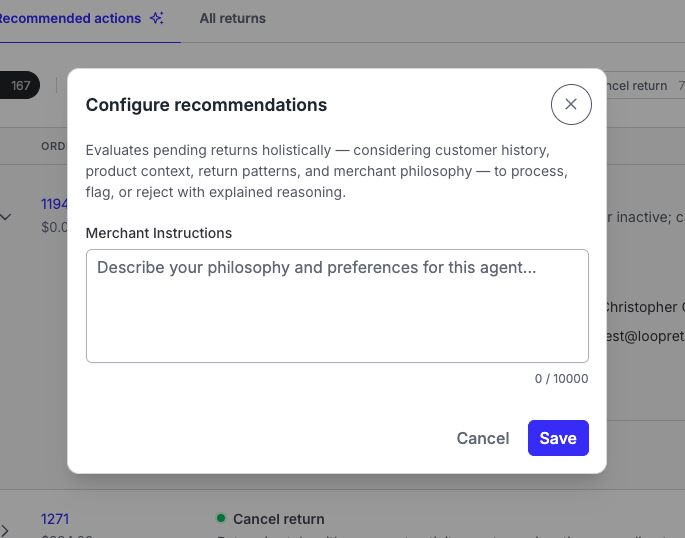
Click Configure in the Returns processing page header.
In the Configure recommendations modal, enter your Merchant Instructions — describe your preferences, exceptions, and return philosophy (up to 10,000 characters).
Click Save.
Tip: Be specific in your merchant instructions. "Always flag returns over $500 from first-time buyers" will produce better results than "be careful with high-value returns." You can refine these at any time.
Note: If no instructions are entered, Loop's default agent behavior applies. Merchant instructions are supplementary — they do not replace default logic.
Step 3: Review recommendations
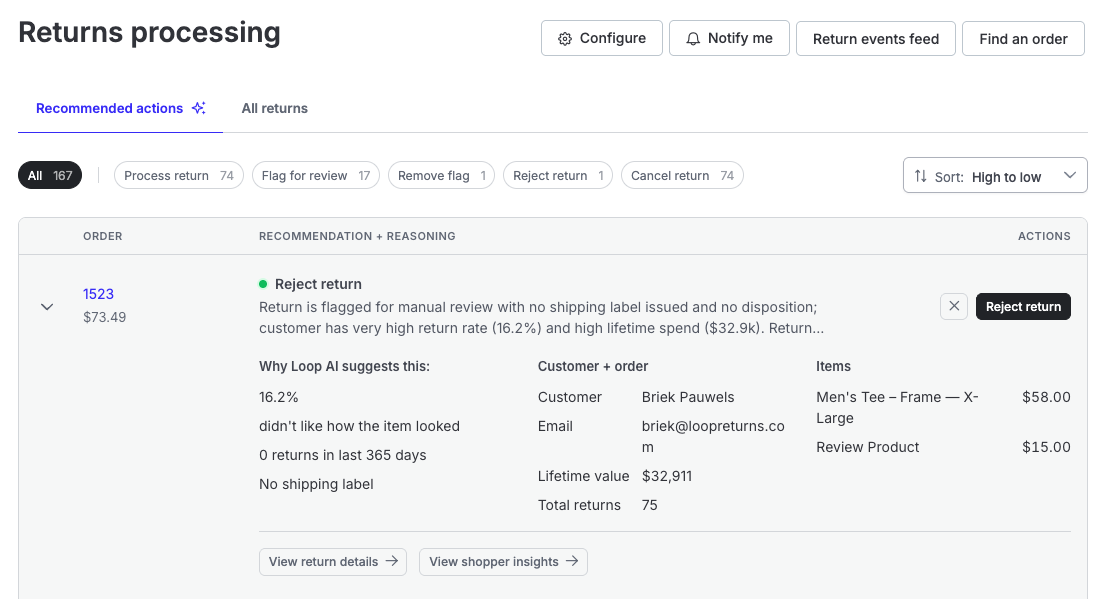
Scan the table for proposed actions, confidence level (green/orange/red dot), and reasoning summary.
Use the filter chips to focus on a specific action type (e.g., Flag for review, Cancel return).
Expand any row to see the full AI reasoning, customer and order details, items, and links to View return details and View shopper insights.
Click the action button (e.g., Flag for review) to run the recommendation, or click the ✕ to dismiss it.
When dismissing, optionally explain why — this feedback directly improves future recommendations.
Step 4: Return to All returns as needed
Use the All returns tab for your standard returns queue and processing workflow.
Important: Auto mode — where agents execute actions without your review — is configured internally by the Loop team during rollout. It is not toggled in the merchant UI today. All merchants begin in Recommendation mode.
Admin and portal experience
Background Agents is a Loop Admin-only feature. It does not change the shopper-facing returns portal experience.
In Loop Admin, the Recommended actions tab appears on the Return processing page when the feature is enabled. The tab is marked with a sparkle icon (✦) and sits alongside All returns. Above the recommendations table, filter chips let you narrow by action type: Process return, Flag for review, Remove flag, Reject return, and Cancel return.
The Configure button in the page header opens the merchant instructions modal. This is the only merchant-facing configuration surface for Background Agents.
FAQ
Where do I find Background Agents in Loop Admin? Go to Returns > Return processing and select the Recommended actions tab. There is no separate Background Agents section in the admin navigation.
I can see the Recommended actions tab but there are no recommendations yet — why? The Returns Queue Manager runs on a 1-hour schedule. Allow time for the next scheduled run and check back. If the tab is missing entirely, confirm both Background Agents feature flags are enabled for your shop with your Loop contact.
Should I always run every recommendation? No. Expand each row to review the full reasoning and return context before acting. Dismiss — with a reason — when a recommendation doesn't match your policy. Low-confidence recommendations (red dot) especially warrant a closer look before running. The feedback loop is what improves agent quality over time.
What do the colored dots mean? Green = high confidence, orange = medium confidence, red = low confidence. Confidence reflects how certain the agent is about its proposed action given the available signals.
How is this different from Loop Assistant? Loop Assistant is on-demand chat — you ask questions and get help in the moment. Background Agents run on a schedule in the background, proactively reviewing returns and proposing actions without you initiating anything.
How is this different from Workflows? Workflows are deterministic if/then rules that trigger on return events. Background Agents reason across multiple signals simultaneously and explain their judgment. They handle edge cases and nuance that Workflows can't express. Workflows always run first; agents do not override or duplicate them.
Will Background Agents override my workflows? No. Workflows run first. Background Agents see what workflows already decided and do not contradict them.
Why should I provide reasons when I dismiss a recommendation? Dismiss reasons are the primary learning signal for the agent. The more context you provide, the better future recommendations will align with your team's preferences and philosophy.
Is Run History available in the Admin? Not today. Reasoning for each pending recommendation is visible when you expand a row in the Recommended actions tab. Full run audit data is retained internally. Run History as a merchant-facing view is on the roadmap.
Can multiple team members use Recommended actions? Yes. Anyone with Admin role access to your Loop account can view and act on recommendations. Merchant instructions apply to all agent runs for your shop.
Please reach out to support@loopreturns.com with any additional questions.