
Finale (Descartes) Integration
OVERVIEW
The Finale (Descartes) integration connects Loop Returns with your Finale inventory management system (IMS). When a customer submits a return in Loop, a return record is automatically created in Finale and assigned to your warehouse facility. Once your team processes the return in Finale, Loop is updated and closed automatically.
Use the menu on the left to quickly navigate this article.
How it works
A customer submits a return in Loop.
The integration creates a return in Finale and assigns it to your configured facility.
Your team receives and processes the return in Finale.
When Finale marks the return as complete, Loop is updated and the return is closed.
Setup
What you'll need
Finale API Key and Secret — From Finale under Settings > API.
Finale Account Name — The subdomain from your Finale URL. For example, if your URL is
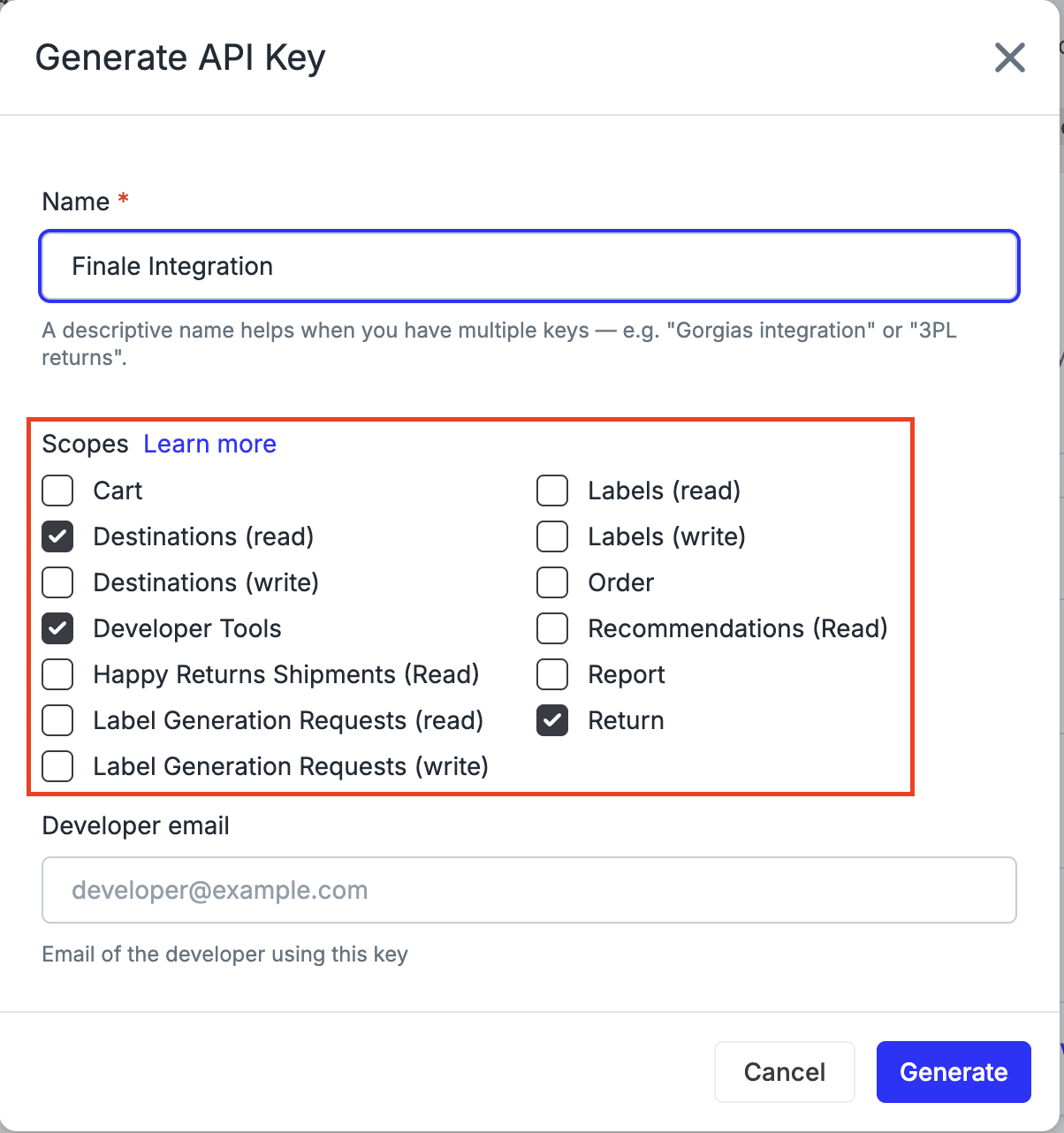
https://app.finaleinventory.com/mystore/api/, your account name ismystore.Loop API key — Generate one in Loop Admin under Returns management > Tools & integrations > Developer tools. Required scopes: Return, Developer Tools, Destinations (read).
Steps
Contact the Loop team to receive your onboarding link for the Finale integration.
Open the link and enter your Finale API Key, API Secret, and Account Name.
Enter your Loop API key.
Enter your Destination Facility Name — this must match the Location name in Finale exactly as it appears under Settings > Facility > Location.
Optionally configure Return Reason Mapping to map your Loop return reasons to Finale reason IDs (found in Finale under Application settings > Selling > Returns > Return reasons — use the ID, not the display name).
Optionally configure Flag Reasons — a comma-separated list of return reason labels that should be held for manual review in Loop rather than auto-closed.
Begin testing with a live return.
Important: Your Destination Facility Name must match the facility name in Finale character-for-character, including capitalization. Copy it directly from Finale under Settings > Facilities to avoid issues.
FAQ
How important is it that the Facility Name matches exactly? Very important. The facility name must match character-for-character with what appears in Finale, including capitalization. Copy it directly from Finale > Settings > Facilities to avoid issues.
What if I don't configure Return Reason Mapping? Unmapped return reasons are simply left out of the return record in Finale — returns are still created successfully, just without a reason code. You can add mappings at any time.
What are Flag Reasons? Flag Reasons let you hold certain returns for manual review in Loop instead of auto-closing them. For example, if you want all "Damaged" returns reviewed by your team before closing, add Damaged to your Flag Reasons list. These returns will appear flagged in Loop Admin for your team to action.
Do my orders and products need to exist in Finale before a return can be created? Yes. Finale validates that both the order and the returned product SKU exist in its system. If an order is very recent and hasn't synced from Shopify to Finale yet, the integration will retry automatically. If the issue persists, check your Shopify-to-Finale sync.
Who supports this integration? This integration is built and maintained by Loop. If you run into any issues either during setup or testing, please reach out to support@loopreturns.com. We're here to help!
Please reach out to support@loopreturns.com with any additional questions.