
Apparel21 Integration
OVERVIEW
The Apparel21 integration connects Loop Returns with your Apparel21 ERP system. When a customer initiates a return through Loop, the integration automatically creates a matching return order (RMA) in Apparel21. Once your warehouse receives and processes the returned items in Apparel21, the integration updates the return status back in Loop, keeping both systems in sync without any manual data entry.
Use the menu on the left to quickly navigate this article.
How it works
A customer initiates a return through Loop, which triggers the integration automatically.
The integration looks up the original order in Apparel21, matching it using your Shopify order number.
A return order (RMA) is created in Apparel21 with the correct SKUs, quantities, and return reasons.
Your warehouse team receives and processes the return in Apparel21 as normal.
Every 15 minutes, the integration checks Apparel21 for completed returns and updates Loop with the received item status.
Loop finalizes the return (refund, exchange, or store credit) based on the graded items.
Setup
What you'll need
From Apparel21:
API Host URL — The base URL for your Apparel21 Retail API (e.g.
https://retailapi.cloud-21.net:9090/RetailAPILIVE_YOURSTORE).API Username — Your Apparel21 API username for authentication.
API Password — Your Apparel21 API password for authentication.
Country Code — The region code used in Apparel21 API requests (e.g. AU, NZ, GB).
From Loop:
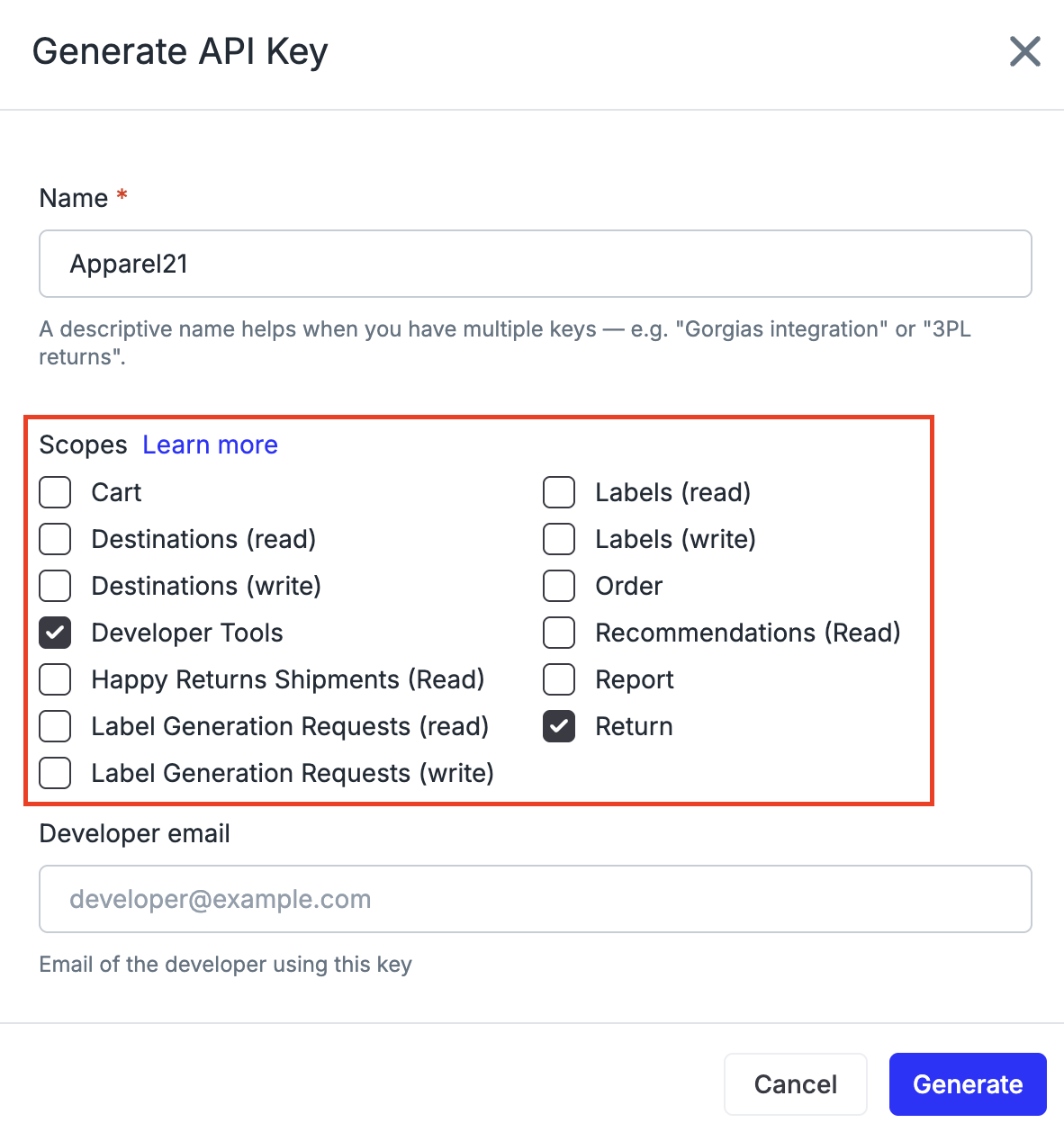
Loop API Key — Generate in Loop Admin under Developer Tools. Required scopes: Returns and Developer Tools.
Steps
In Loop Admin, go to Developer Tools and click Generate API Key. Enable the Returns (read), Returns (write), and Developer Tools scopes, then click Generate. Copy the key.
Open the onboarding link provided by the Loop team and enter your Loop API Key.
Enter the Apparel21 API Host URL, API Username, and API Password provided by your Apparel21 team.
Set your Country Code (e.g. AU for Australia).
Optionally configure the Order Number Prefix and Suffix if your Apparel21 order numbers differ from your Shopify order numbers (e.g. a prefix like
ADV#). Leave blank if they match — the integration will learn the correct format automatically.Optionally map your Loop return reasons to Apparel21 return reason IDs. Select a Default Return Reason as a fallback for any unmapped reasons.
Tip: If your Apparel21 and Shopify order numbers match, leave the Order Number Prefix and Suffix blank — the integration tries multiple formats automatically and remembers the one that works for your account.
FAQ
How long does it take for a return to show up in Apparel21? Returns are sent to Apparel21 within seconds of being created in Loop. The integration is triggered in real time by a webhook.
How often does the integration check for completed returns? The integration polls Apparel21 every 15 minutes for returns that have been received and processed at the warehouse.
What if my Shopify order numbers don't match my Apparel21 order numbers? You can configure a prefix and/or suffix in the integration settings. The integration also tries multiple order number formats automatically and remembers which format works for your account.
What if a return reason in Loop doesn't have a mapping in Apparel21? The integration will use the Default Return Reason you selected during setup. If no default is configured, a generic reason ID is used.
Who do I contact for help? If you run into any issues either during setup or testing, please reach out to support@loopreturns.com. We're here to help!
Please reach out to support@loopreturns.com with any additional questions.