
Monta Integration
OVERVIEW
The Monta integration connects Loop Returns with your Monta 3PL warehouse. When a customer submits a return in Loop, Monta is notified in advance so they can prepare to receive the shipment. When your items arrive and are processed, Loop is updated automatically.
Use the menu on the left to quickly navigate this article.
How it works
A customer submits a return in Loop.
The integration sends a return forecast to Monta, notifying them that a package is on its way.
Monta receives, inspects, and processes the returned items.
When Monta marks the return as processed, Loop is updated and the return is closed.
Setup
What you'll need
Monta credentials — Username and Password for a Monta Web-user account. This must be a Web-user account, not an SSO account. Contact your Monta account manager if you are unsure which type of account you have.
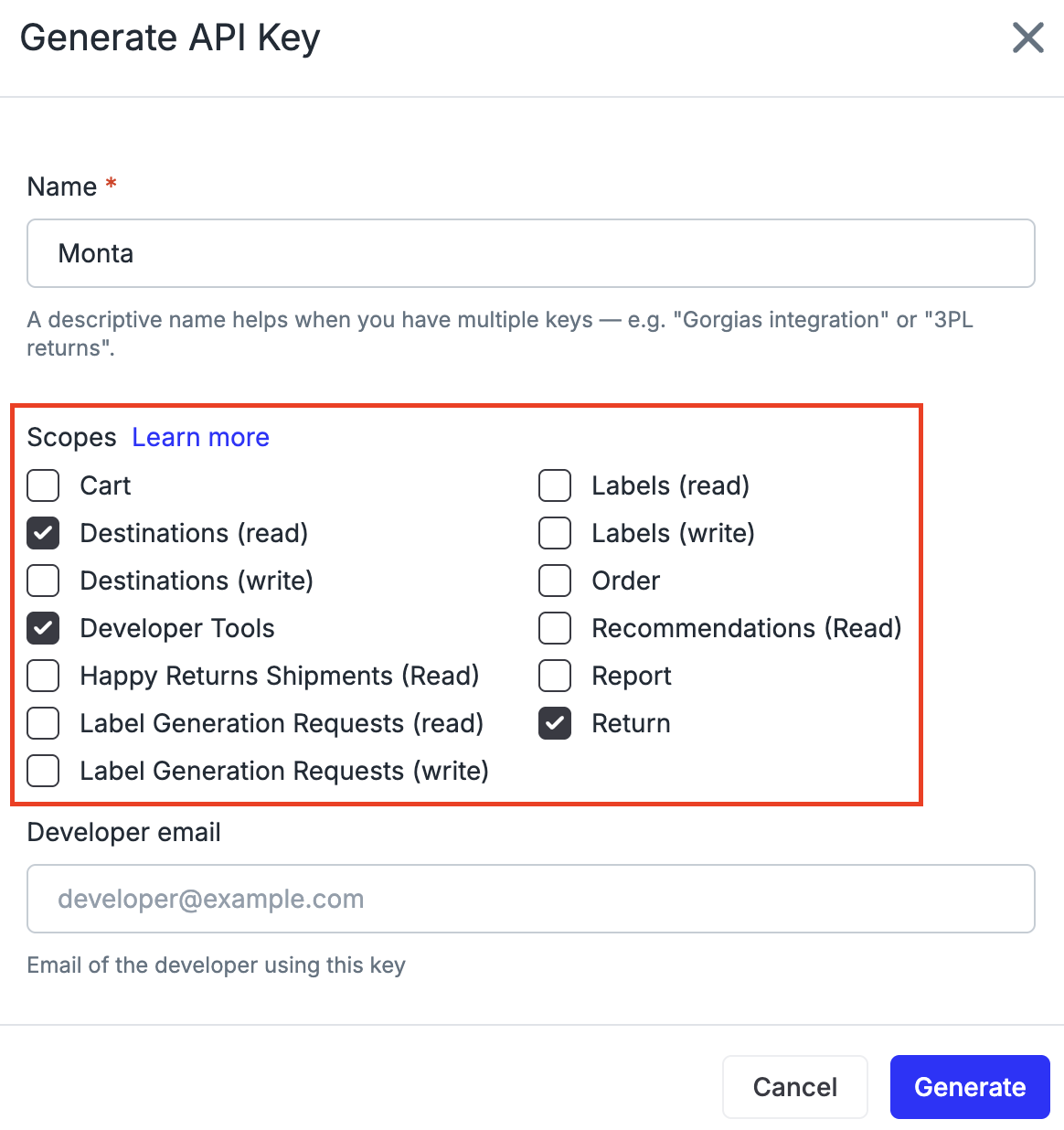
Loop API key — Generate one in Loop Admin under Returns management > Tools & integrations > Developer tools. Required scopes: Return, Developer Tools, Destinations (read).
Steps
Contact the Loop team to receive your onboarding link for the Monta integration.
Open the link and enter your Monta Username and Password.
Enter your Loop API key.
Optionally enable Discrepancy Auto-Process — when on, returns are automatically closed in Loop even if the quantity Monta received differs from what Loop expected.
Begin testing with a live return.
Important: You must use a Monta Web-user account — not an SSO (Single Sign-On) account. If you currently log into Monta via Google or another SSO provider, ask your Monta account manager to create a dedicated Web-user account for the integration.
FAQ
What type of Monta account do I need? You need a Web-user account — not an SSO (Single Sign-On) account. If you currently log into Monta via Google or another SSO provider, ask your Monta account manager to create a dedicated Web-user account for the integration.
What is Discrepancy Auto-Process? When enabled, Loop automatically closes returns even when the quantity Monta received doesn't match what Loop expected. When disabled, quantity discrepancies hold the return for your team to review manually. Most merchants enable this after verifying the integration is working correctly.
How quickly will Loop be updated after Monta processes the return? Loop is updated within 15 minutes of Monta marking the return as processed.
Who supports this integration? This integration is built and maintained by Loop. If you run into any issues either during setup or testing, please reach out to support@loopreturns.com. We're here to help!
Please reach out to support@loopreturns.com with any additional questions.