
Return Insights
OVERVIEW
Return Insights helps you catch problem products before they cost you. It automatically flags products with an abnormally high return rate by product, ranks them by dollar impact, and shows the return reasons driving the issue. You can also look up any product on demand with Product Explorer — whether it's a new launch you want to keep an eye on or a full Shopify collection you want to check before promoting it — so you always know which of your top returned products need attention first and can catch product return trends early.
Use the menu on the left to quickly navigate this article.
What it is
Return Insights is a Loop admin feature that automatically identifies which of your products are returning at an unusually high rate compared to the rest of your catalog, and lets you look up any product or Shopify collection on demand. Instead of digging through raw return data to spot product return trends yourself, Return Insights surfaces the products that matter most — ranked by how much they're costing you — along with why shoppers are returning them. With Product Explorer, you're no longer limited to what Loop has already flagged: you can check a specific product or an entire collection whenever you want.
Why it matters
Catch problems early. Return Insights looks at a rolling 45-day window, so you find out about a returning product within its first 45 days on the market — not a full season later.
Prioritize by impact, not just volume. Flagged products are ranked by dollar impact (return rate × units sold × value), so you know which ones are actually worth fixing first.
Skip the guesswork. Return reasons are shown alongside each flagged product, so you don't have to dig through separate reports to understand what's driving the return.
Look up anything, not just what's flagged. Product Explorer turns Return Insights into a lookup tool as well as an alert feed — check any product or collection on demand, including ones that haven't tripped the outlier threshold.
Use Cases
You launch a new style and, within the first two weeks, Return Insights flags it as returning at several times your baseline rate — driven by sizing as the top return reason — so you can update the size chart before the issue compounds across a full season of sales.
You use Return Insights' dollar-impact ranking to decide which of several underperforming products to prioritize fixing first, rather than guessing based on raw return count or return rate.
You're about to push more ad spend toward a collection and pull it into Product Explorer first, to check whether any products in it are quietly driving high returns before sending more volume their way.
A support rep gets asked about a specific SKU that's never been flagged as an outlier. Instead of pulling a custom report, they search for it directly in Product Explorer and pull up its return rate and reasons on the spot.
How it works
Return Insights continuously reviews your return activity over a rolling 45-day window and compares each product's return rate to your catalog's overall baseline. Products whose return rate is a statistical outlier are flagged automatically — you don't need to set any thresholds yourself.
For each flagged product, you'll see:
The estimated dollar impact of its returns
The return reasons shoppers selected
A quick way to tell Loop whether the insight was useful (thumbs up/down)
Note: Return Insights flags at the product level, not the variant level. If you need to see which specific size or color is driving an outlier, use Loop's GoodData return-reason dashboard to look at variant-level detail.
Product Explorer
Product Explorer lets you look up any product directly, or pull in an entire Shopify collection to see which products in it are driving the most avoidable returns. For a searched product, you'll see its return rate, dollar impact, and return reasons once you open it. For a collection, products are ranked so you can quickly spot which ones are worth prioritizing.
Note: Product Explorer's product search and collection lookup are Shopify-only today. Non-Shopify merchants still get automatic outlier flagging on the Flagged and Watchlist tabs.
Note: A collection can't be selected in Product Explorer if it has more than 2,000 products — Loop caps how large a collection it will pull and rank to keep load times reasonable.
Note: Collection rankings can lag up to an hour, since they're cached for 60 minutes.
Watchlist
Alongside your currently flagged products, Watchlist keeps a recent history of products that have been flagged, even after they're no longer active outliers — so you still have somewhere to look for what's been a problem lately, rather than an empty list.
Setup
Return Insights is live for all merchants automatically — there's no setup or configuration needed, and your full 45-day return history backfills right away.
Navigate to Analytics > Return Insights.
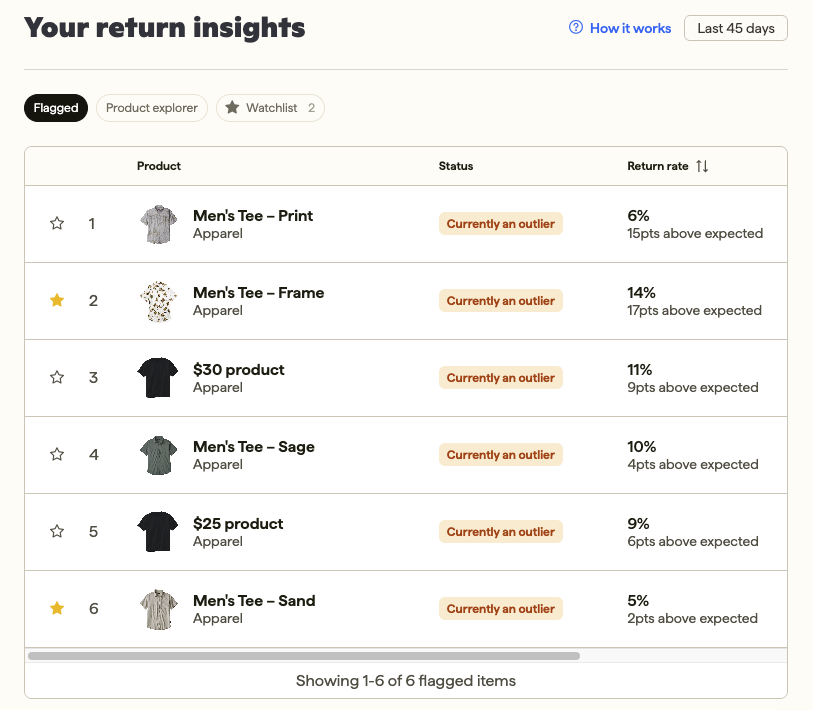
On the Flagged tab, review your flagged products, sorted by dollar impact.
Check the Watchlist tab for recently flagged products, even ones that are no longer active outliers.
Use Product Explorer to search for a specific product, or pull in a Shopify collection to rank the products in it.
Click thumbs up or thumbs down on any insight to tell Loop whether it was helpful — this feedback helps us improve future insights.
Admin experience
Return Insights lives entirely in the Loop admin — there's no shopper-facing or returns-portal component. You'll see three tabs: Flagged (automatically flagged products, ranked by dollar impact), Watchlist (recent flagged history), and Product Explorer (on-demand product and collection lookup).
Note: If you move between tabs in the linked GoodData return-reason dashboard, you'll need to reselect the product filter each time — it doesn't carry over automatically.
FAQ
How often does Return Insights update? Return Insights reviews a rolling 45-day window of return activity, so flagged products and their dollar impact will shift as new returns come in. Collection rankings in Product Explorer are cached for up to an hour.
Can I look up or watch a specific product, instead of only seeing what's automatically flagged? Yes — use Product Explorer to search for any product directly, or pull in a Shopify collection to rank the products in it by dollar impact, whether or not it's already been flagged as an outlier.
Does Return Insights show which size or color is driving a product's return rate? Not natively. Use Loop's GoodData return-reason dashboard to look at variant-level detail as a workaround.
Why can't I select a certain collection in Product Explorer? Collections with more than 2,000 products aren't selectable — Loop caps collection size to keep load times reasonable.
Is Return Insights available if I'm not on Shopify? Automatic outlier flagging (Flagged and Watchlist tabs) is available regardless of platform. Product Explorer's product search and collection lookup are Shopify-only today.
Please reach out to support@loopreturns.com with any additional questions.