
Active Ants Integration
OVERVIEW
Active Ants is a warehouse and fulfillment partner (3PL) that merchants use to manage warehouse operations. Loop's integration with Active Ants handles both label generation and return processing in a single connected setup — there is no separate warehouse-only or labels-only option. When a customer submits a return in Loop, Active Ants automatically generates a return shipping label and creates a return record; when the item arrives and is processed at the warehouse, Loop is updated automatically.
Use the menu on the left to quickly navigate this article.
This integration is built by Synks and maintained by Loop. For any questions about setup or troubleshooting, reach out to support@loopreturns.com.
How it works
Once connected, Loop automatically requests a return shipping label from Active Ants any time a customer submits a return, and Active Ants keeps Loop updated as the item is processed at the warehouse.
A customer submits a return in Loop.
Loop sends a label request to Active Ants.
Active Ants generates a shipping label and creates a return record.
The label is delivered to the customer through Loop.
The customer ships the item; Active Ants receives and processes it.
Loop is updated automatically and the return is closed.
Additional details
This integration handles label generation and return processing together — there is no separate WMS-only or labels-only option.
Return reasons in Loop must be mapped to Active Ants' reason codes during setup for the integration to process returns correctly.
Loop is updated within 15 minutes of Active Ants processing a return.
Important: Cancellations are not automatically forwarded to Active Ants. If a return is canceled in Loop, it must be manually canceled or removed in the Active Ants portal.
Setup
What you'll need
Active Ants credentials — a Username and Password for the Active Ants API. Contact your Active Ants account manager to obtain these; they are separate from your Active Ants portal login.
Loop API key — generated in Loop Admin under Returns management > Tools & integrations > Developer tools.
Note: You must also enable Enable Third Party Labels under Shop Settings in Loop Admin before setup.
Steps
In Loop Admin, navigate to Returns management > Tools & integrations > Developer tools.
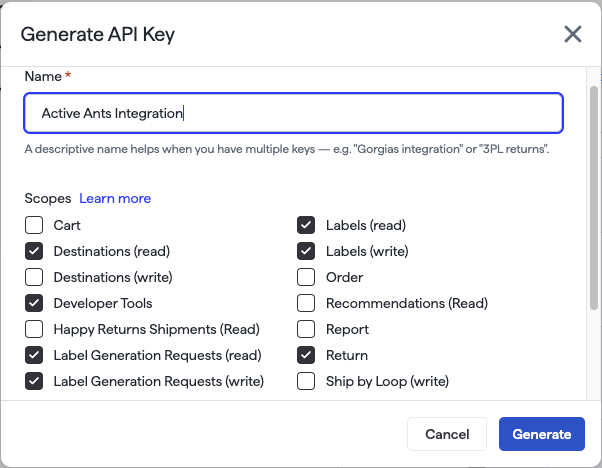
Under API keys, click Generate API key. Select the scopes for Return, Developer Tools, Destinations (read), Labels (read and write), and Label Generation Requests (read and write), then name the key "Active Ants integration." Click Generate.
Note: you'll need to copy & paste this API key in a later step.
Reach out to your Merchant Success Manager, Onboarding Specialist, or support@loopreturns.com to receive your onboarding link for the Active Ants integration.
Open the onboarding link and enter your Active Ants Username and Password.
Paste the Loop API key you generated in step 2 into the Loop API key field.
Configure Return Reason Mapping — map each Loop return reason to an Active Ants reason code. This step is required for the integration to process returns correctly.
Optionally configure Return Shipping Method Mapping to route different shipping methods to different Active Ants options. A Default fallback is supported.
Click Save, then begin testing with a live return.
Tip: Submit a test return first to confirm labels and reason mapping are working before rolling this out to all customers.
FAQ
Do I need a separate WMS integration?
No. The Active Ants integration handles both label generation and return processing together. There is no WMS-only option.
What credentials do I get from Active Ants?
A Username and Password for the Active Ants API. Contact your Active Ants account manager to get these — they are separate from your Active Ants portal login.
How quickly will Loop be updated after Active Ants receives my items?
Loop is updated within 15 minutes of Active Ants processing the return.
What happens if I cancel a return in Loop?
Cancellations are not automatically forwarded to Active Ants. If you cancel a return in Loop, you'll need to manually cancel or remove it in your Active Ants portal.
Who supports this integration?
This integration was built by Synks. You can direct any feedback or support requests directly to the Loop team at support@loopreturns.com.
Is there an additional cost to use this integration?
No, any merchant with access to integrations in Loop can use the Active Ants integration at no additional cost.
Please contact support@loopreturns.com for any additional questions on this integration.