
AI Image Recognition
OVERVIEW
This article explains AI Image Recognition, which automatically analyzes shopper-uploaded photos during returns and provides structured assessments of item condition. It covers the standardized outputs including damage descriptions, condition labels, tag presence, packaging status, and product verification, how assessments appear in the Loop admin with hover indicators on photos, and clarifies that merchants maintain final judgment while the AI reduces manual review workload.
Use the menu on the left to quickly navigate this article.
Why it matters
AI Image Recognition automatically reviews shopper uploaded photos during a return and provides structured assessments of the item’s condition. These assessments help your team quickly identify damage, determine resell eligibility, and reduce time spent manually reviewing images.
How it Works
When a shopper uploads photos in the return flow, each image is analyzed by Loop’s AI Image analysis service. The model produces a set of standardized outputs for every photo:
Assessments Provided
Description
A short summary of visible damage.
If no damage is detected, the description will be “no-damage.”
Item condition
One of the following labels: in-package, perfect, good, fair, poor, damaged
Has tags
Yes/No - whether tags or stickers appear attached.
Is damaged
Yes/No - whether the item appears to have visible damage.
In package
Yes/No - whether the item appears inside its original packaging.
Is correct package/product
Yes/No - whether the item appears to be the correct product.
These outputs appear in the Return Details page when hovering over the ✨ icon positioned top left of each uploaded photo.
Data Used by the Model
To generate accurate assessments, the system uses:
Return details (ID, product IDs, SKU, return reason text)
Product data from Shopify
Workflow-specific rules (e.g., required tag photos)
These help the model contextualize the uploaded images and evaluate them more accurately.
Setup
No setup is required.
AI Image Protection is enabled for all Loop merchants and works automatically on any return with photo uploads.
Admin Experience
In the Return Details page, merchants will see:
Per-image assessments
Description (e.g., “no-damage”, “dirt on outsole”)
Item condition
Yes/No indicators for:
Tags attached
Visible damage
Correct product
In original packaging
Examples
Example “no-damage” output
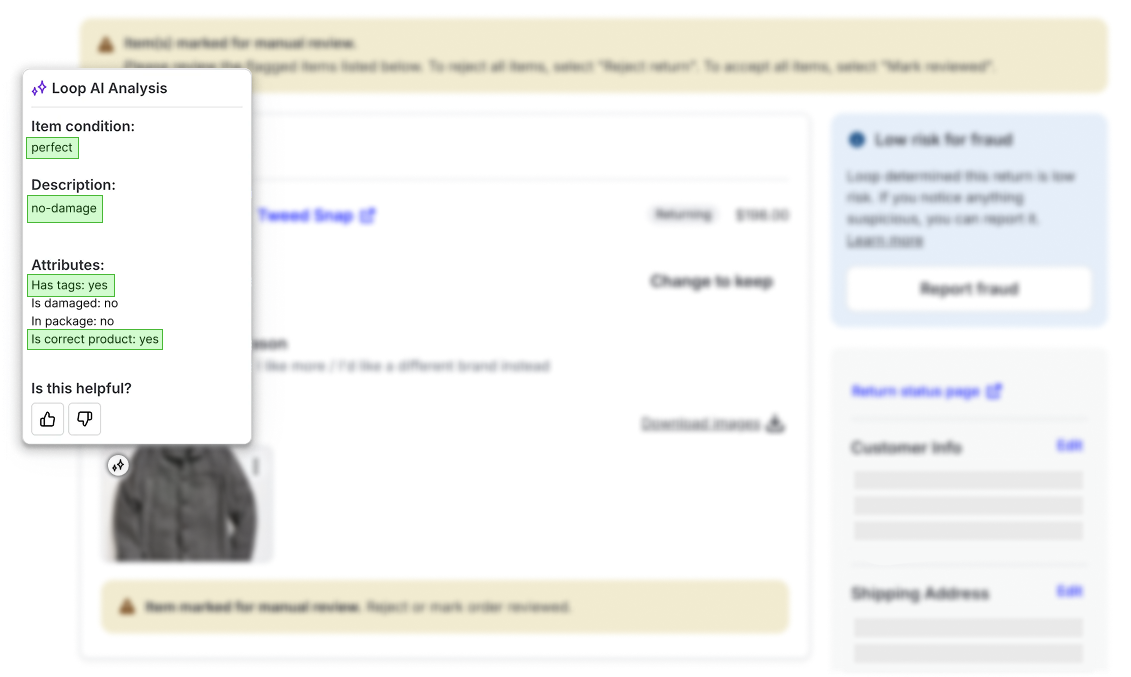
Example “damaged” output and incorrect package/product flag
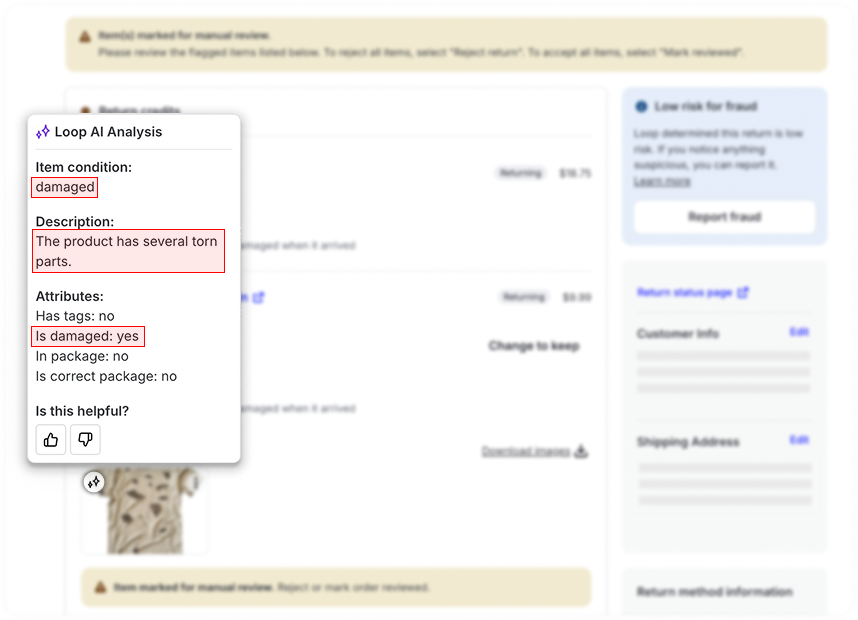
Behavior Notes
If the image is unclear or the model cannot assess confidently, the merchant should manually review.
Merchants may override or disregard AI outputs at any time.
The AI evaluates whatever the shopper submits — image quality enforcement is not handled by the model.
Shopper Portal Experience
No changes to shopper experience.
Customers upload images according to your existing workflow rules.
The portal does not evaluate or enforce photo quality.
FAQ
What assessments does the AI provide? Damage description, item condition label, presence of tags, visible damage indicator, packaging indicator, and correct product indicator
Can the AI confirm exact product identity? It provides an estimation based on the image. If the product is unclear or partially shown, merchants should manually validate.
What if the photo is low quality? The model still attempts an assessment, but unclear or blurry images should be manually reviewed.
Does the AI replace manual review entirely? No. It can significantly reduce manual workload, but merchants maintain final judgment.
How does this differ from fraud tools? Image analysis and Fraud Tools are separate features. We don't recommend using image analysis alone for fraud prevention; merchants concerned about fraud should use our existing fraud tools service.
For additional questions, please reach out to support@loopreturns.com.