
EU Right of Withdrawal (Cooling Period) Compliance
OVERVIEW
This article explains how to support the EU's right of withdrawal in Loop — commonly called the 14-day cooling period — including the EU withdrawal button requirement under Directive (EU) 2023/2673 (effective 19 June 2026). Under EU law, shoppers who buy online may withdraw from their purchase within 14 days of delivery without giving a reason and must be offered a full refund. Loop now offers a native EU Withdrawal Flow that provides a compliant withdrawal function for Shopify merchants — Loop handles the withdrawal button, eligibility window, refund, and return-label options automatically. This guide covers how the native flow works and how to set it up, a manual configuration fallback for merchants not on the native flow, and how Checkout+ fits within this regulation.
Use the menu on the left to quickly navigate this article.
What it is
The EU right of withdrawal is a consumer protection law (Annex I(B) to Directive 2011/83/EU) that applies to any online or distance purchase made by a shopper located in the European Union or the EFTA markets (Norway, Iceland, and Liechtenstein). Under this directive, shoppers have an unconditional right to cancel their order and return eligible goods within 14 calendar days of delivery - with no justification required.
Going into effect 19 June 2026, a newer directive - Directive (EU) 2023/2673 - adds a further requirement: online stores must provide a prominent, easy-to-use withdrawal button (a "withdrawal function") so shoppers can exercise that 14-day right online, with no more friction than it took to place the order.
Merchants selling to EU or EFTA shoppers are legally required to:
Offer a return window of at least 14 days from the date of delivery
Make a full refund available, including the standard outbound delivery charge paid by the shopper
Provide shoppers with the model withdrawal form (Annex I(B) to Directive 2011/83/EU) and a way to submit it
Provide an online withdrawal button that is clearly labeled, stays available throughout the 14-day window, leads to a two-step confirmation, and triggers an automatic confirmation email (the new 2023/2673 requirement)
If the 14-day deadline falls on a non-business day, it extends automatically to the next working day.
What's new in Loop: Loop now provides a native EU Withdrawal Flow for Shopify merchants. It supplies the compliant withdrawal function — a dedicated /withdrawal page, two-step confirmation, and an automatic confirmation email — automatically enforces the 14-day window, and issues the refund (order value, shipping, duties, and taxes). You can also choose how the shopper gets their item back to you: Loop can generate the return label for the shopper (with the label cost coming out of their refund), or the shopper can provide their own label. See Return labels below.
Note: This replaces the manual, workaround-based approach previously required. Merchants who can't yet use the native flow can still achieve compliance through the manual configuration steps further below.
Important: This article is informational guidance to help you use Loop's settings to support compliance. It is not legal advice. The withdrawal button requirement is new and the technical bar is strict - Loop strongly recommends confirming your specific obligations with a legal professional.
Why it matters
The EU right of withdrawal applies to any merchant selling to shoppers in EU or EFTA member states - regardless of where the merchant is based. The compliance deadline for the new withdrawal button is 19 June 2026. Merchants who do not meet the minimum requirements risk regulatory action, customer disputes, and reputational harm.
With the native EU Withdrawal Flow, Loop now covers both sides of the directive for Shopify merchants:
The withdrawal function itself - the button, two-step confirmation, and automatic confirmation email - natively, with no third-party app.
The return and refund side - the 14-day window, full refund, and outbound shipping, duties, and taxes refund - automatically.
Note: The native EU Withdrawal Flow is Shopify-only in V1 and is rolling out progressively, so it may not be enabled on every store yet. Non-Shopify merchants are not yet supported. If the native flow isn't available to you, use the Manual configuration (fallback) steps below to stay compliant.
How the native EU Withdrawal Flow works
Once the setting is enabled and you've embedded your withdrawal link, Loop handles the rest automatically. The flow lives at a dedicated withdrawal URL (shown in your setup flow - see Setup) - separate from your standard returns portal, which stays in place.
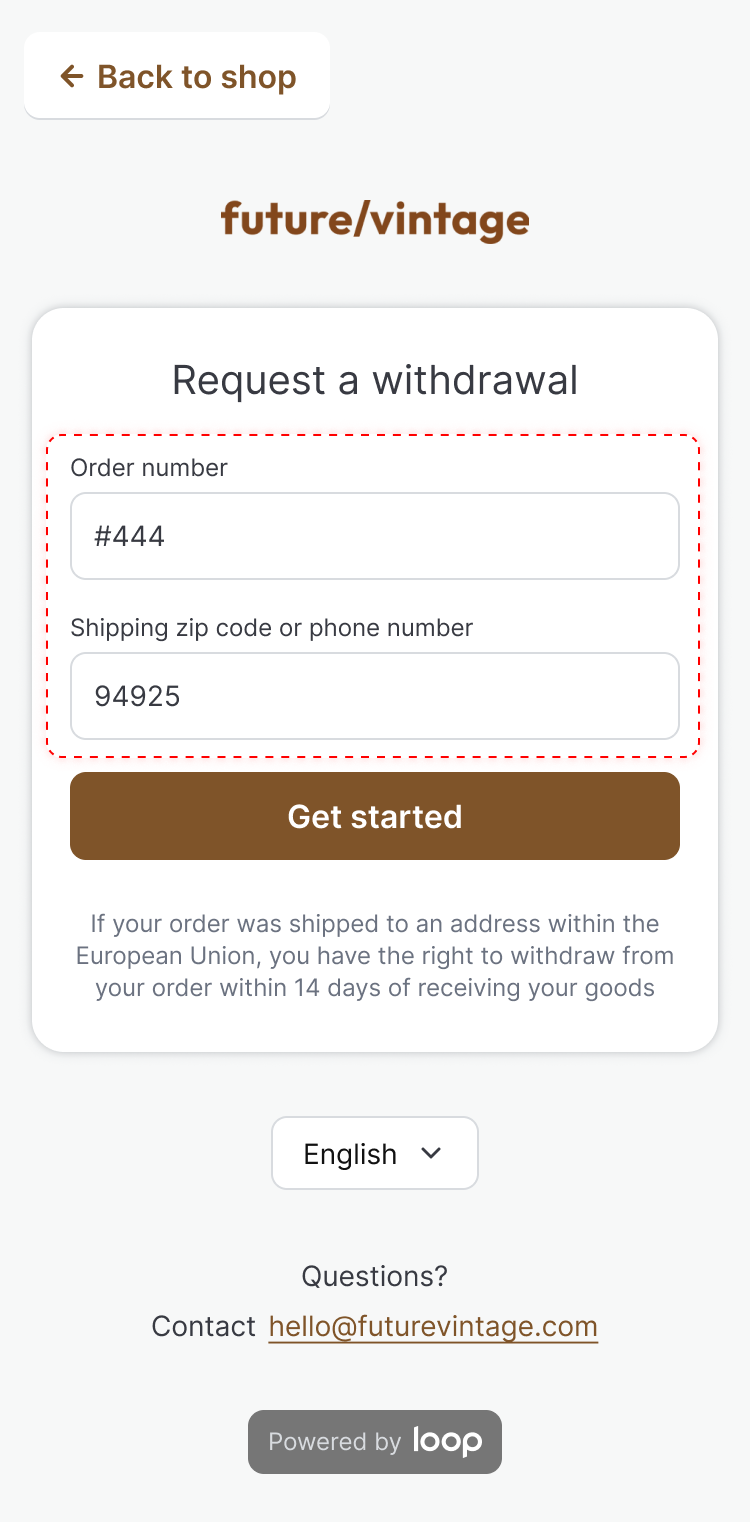
The shopper visits your
/withdrawalURL and looks up their order using their order number plus a secondary identifier (email or zip - the same as the returns flow).On the Select item(s) to withdraw screen, the shopper selects one or more items from the order (they can withdraw part of the order, and add more items later).
A bar shows how many items are selected. The shopper clicks Continue with withdrawal, then confirms on a final step - a clearly labeled submit-and-confirm, as required by EU law.
Loop checks eligibility - the order must be within 14 calendar days of delivery.
The shopper sees a "Your withdrawal request has been submitted" confirmation with a withdrawal summary and the items to send back. Loop then:
Sends the shopper a withdrawal-specific confirmation email (auto-enabled; edit the template under Notifications).
Handles return shipping based on your setup (see Return labels below): if you use Loop-generated labels, the shopper receives a return label and the label cost is deducted from their refund; if the shopper provides their own label, they receive your return shipping address and instructions and arrange shipping themselves.
Provides a packing slip the shopper is asked to include so you can match it to the order.
Creates a return record in your Loop dashboard.
You process the withdrawal (manually, or automatically if configured), and the refund — order value, shipping, duties, and taxes, less any Loop-generated label cost — is issued.
How withdrawals are distinguished from returns
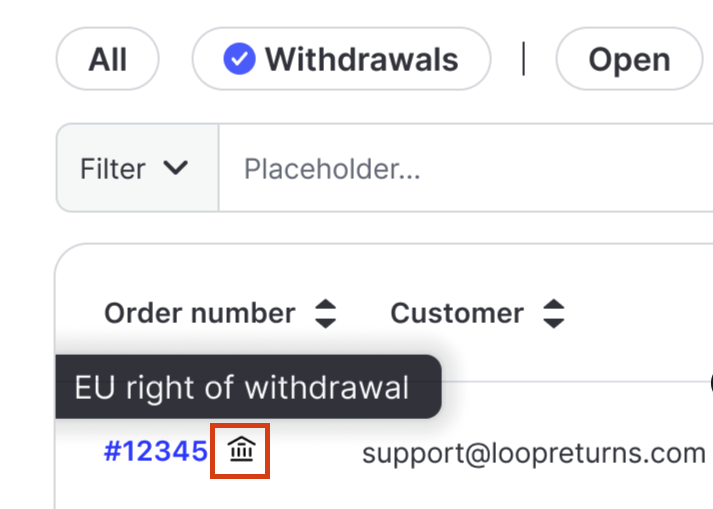
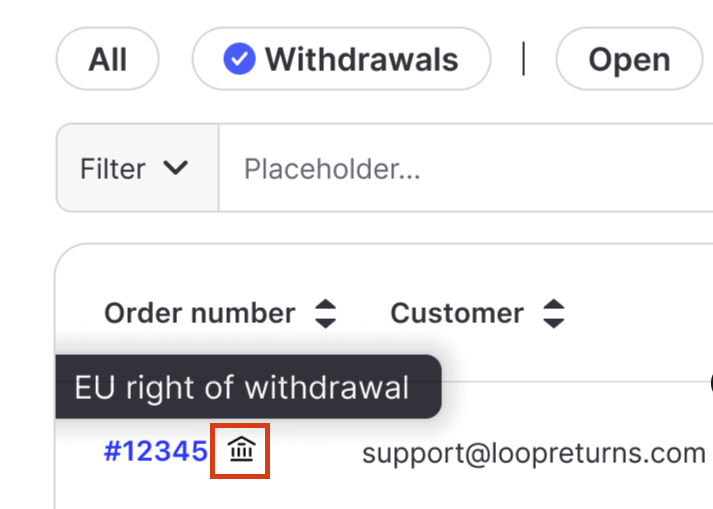
Withdrawals appear in your Returns dashboard alongside standard returns, marked with a dedicated building icon (its tooltip reads "EU right of withdrawal") so your team can tell them apart. Key differences to keep in mind:
The refund covers the full item value plus shipping, duties, and taxes — reduced only by the return-label cost if you use Loop-generated labels. / Return shipping follows your label choice — Loop can generate the return label (cost deducted from the refund), or the shopper provides their own label and ships the item back using your return address.
Final sale, customized, and perishable items are eligible - the legal right of withdrawal overrides item-level return restrictions in V1.
Return labels
When you set up the native flow, you choose how shoppers return withdrawn items (see Setup Step 1). There are two modes:
Customer provides their own label — the shopper receives your return address and shipping instructions and arranges and pays for return shipping themselves. Loop does not generate a label.
Loop-generated label — Loop creates a return label for the shopper, and the estimated label cost is deducted from their refund. EU law lets you make the shopper responsible for return postage as long as it's disclosed upfront, so state this in your return policy.
Important: The native withdrawal flow supports only these two options — a Loop-generated label (single label via Loop's own carrier) or a customer-provided label. Third-party / external-connector labels and multi-label returns (more than one return label on a single withdrawal) are not supported for withdrawals today. If you rely on an external label connector or multiple carriers/labels for your standard EU returns, that setup does not carry over to the withdrawal flow — withdrawing shoppers get either one Loop-generated label or your return address to arrange their own shipping.
A few things to know about Loop-generated labels:
The amount deducted is Loop's estimated label cost, which can differ slightly from the actual cost charged later — this works the same way handling fees do today.
Automatic fallback: if the estimated label cost is greater than the value of the returned items, Loop can't ask a withdrawing shopper to pay the difference, so it automatically falls back to the customer-provides-their-own-label experience for that withdrawal. The shopper simply sees your return address and shipping instructions and ships the item back at their own cost. This happens silently — there is no separate merchant notification today.
Tip: Label cost depends on where the item ships back to. If your only return destination is outside the EU (for example, a US address), return labels for EU shoppers will be expensive and will frequently trigger the fallback above. To keep Loop-generated labels usable, configure an in-region EU return destination. See Destinations.
Unfulfilled and split orders
If the entire order is unfulfilled, Loop cancels the order outright so you avoid shipping costs.
In a split fulfillment (some items shipped, some not), fulfilled items go through the withdrawal flow; unfulfilled items are frozen (the warehouse is blocked from shipping them) and the refund is issued by Loop. Frozen items remain on the order in a held state and are not restocked.
How withdrawals and returns work together
Withdrawals and standard returns run side by side, and a shopper can use whichever fits their situation. Both appear in your Returns admin.
Your EU returns policy is up to you. Whether you keep a dedicated EU returns policy - or have one at all - is fully at your discretion, as long as you also offer the withdrawal option to EU/EFTA shoppers.
Returns do more; withdrawals stay simple. Standard returns capture return reasons, give you chances to retain revenue (exchanges, store credit, Shop Now), and can include a prepaid label. The withdrawal flow is intentionally kept simple and compliant with the legislation - the item value, shipping, duties, and taxes are refunded, no questions asked (less the return-label cost if you use Loop-generated labels).
Shoppers can use either. Both the returns portal and the withdrawal flow stay available, and every request shows up in the Returns admin.
Setup: Native EU Withdrawal Flow (Shopify)
To set up the native flow, navigate to Returns management > Policy settings > General in the Loop admin and turn on the EU Right of Withdrawal setting ("Activates the 14-day withdrawal flow for EU orders"). Turning it on opens a three-step setup flow.
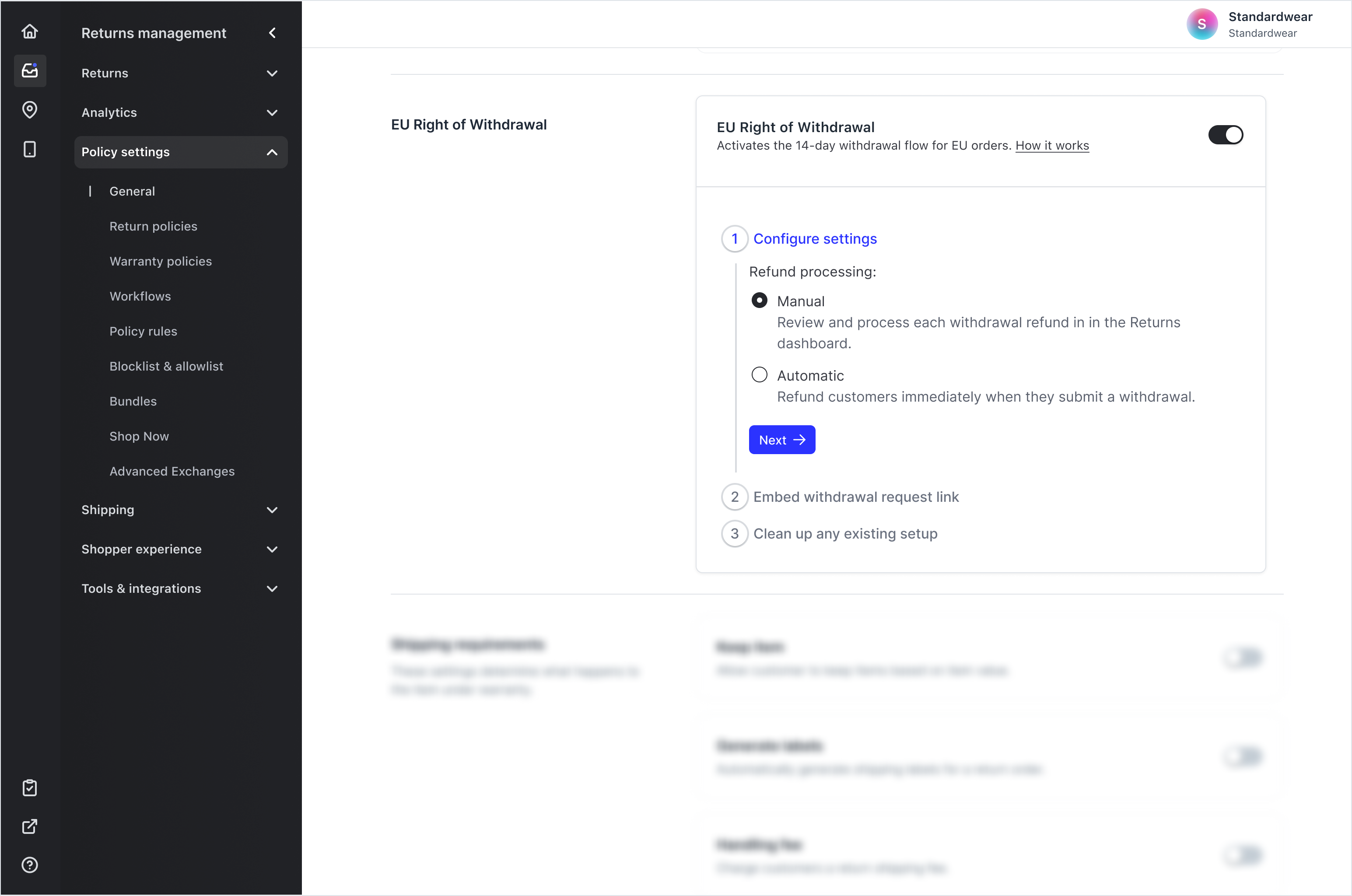
Note: This setting is turned on automatically for merchants who have at least one return policy that includes a covered EU/EFTA country. If that applies to you, it may already be on - but you must still embed your withdrawal link (Step 2) to go live. Merchants without an EU return policy can turn it on manually.
Step 1: Refund processing settings
Choose your Refund processing mode:
Manual (default) - review and process each withdrawal refund in the Returns dashboard.
Automatic - refund customers immediately when they submit a withdrawal.
Tip: Automatic processing reduces handling time for higher-volume EU merchants, but issues the refund on submission - which exposes more risk for products that aren't sent back. You're responsible for processing withdrawals within the legally required time frame either way.
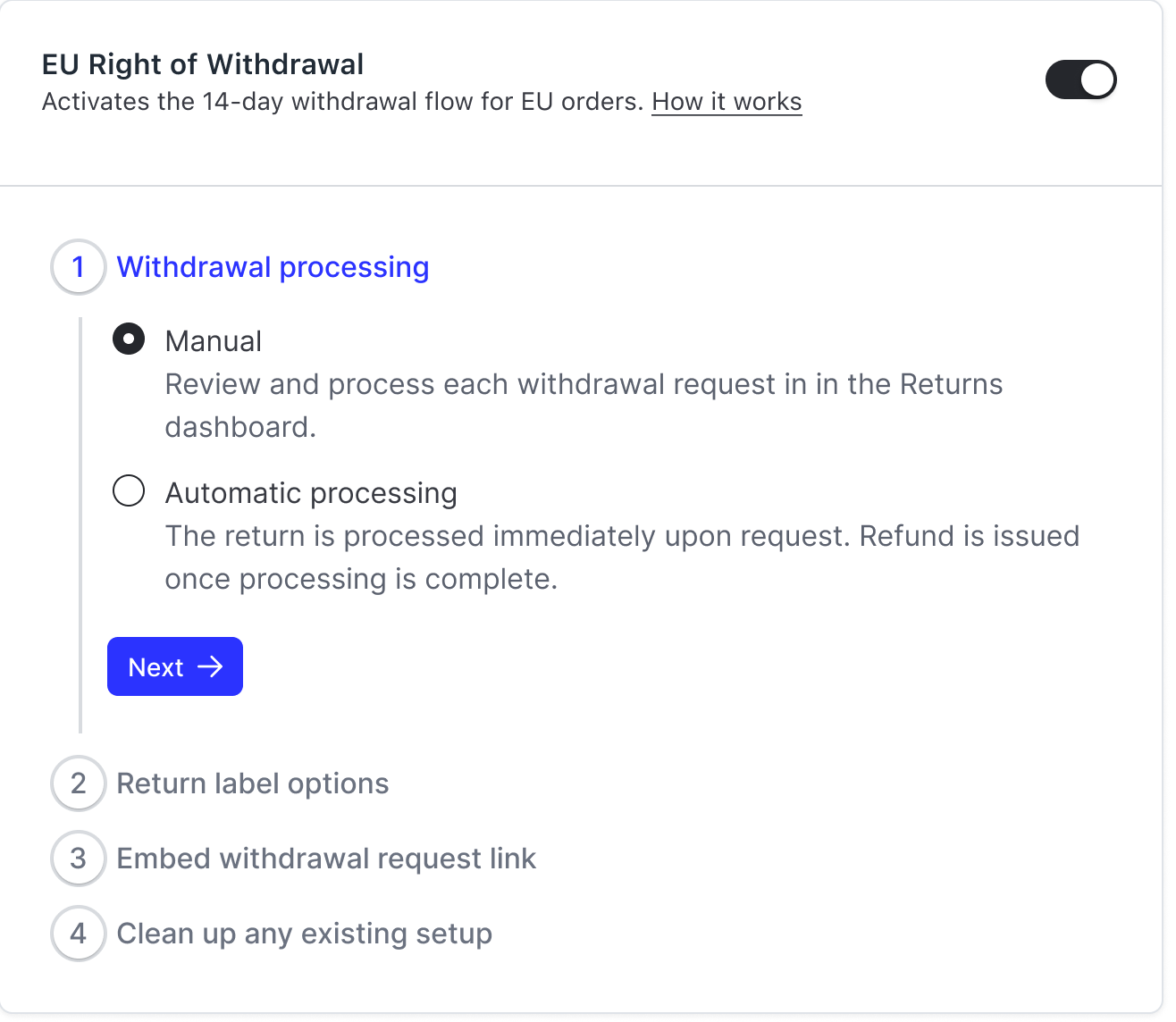
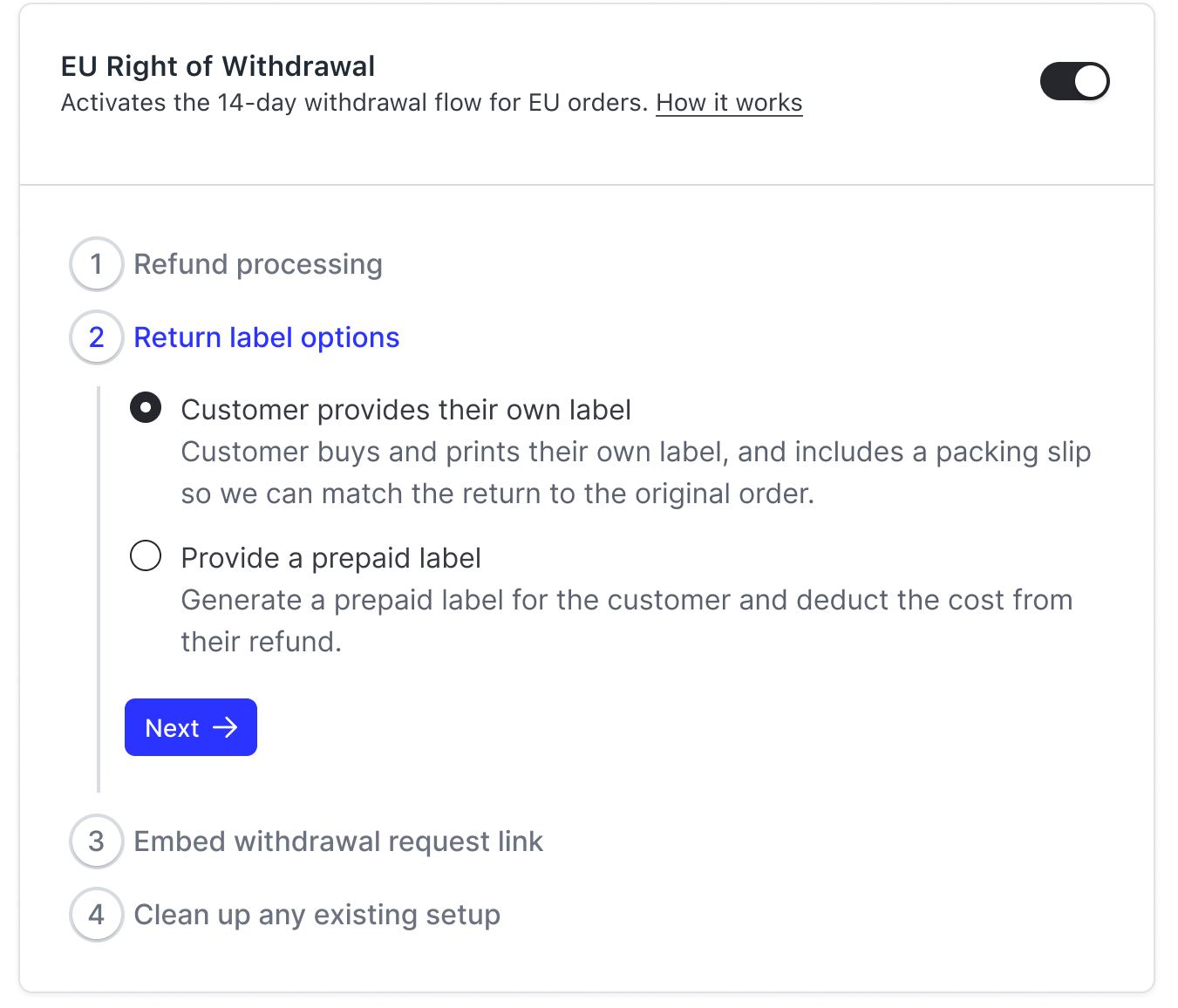
Step 2: Return label options
Choose how shoppers return withdrawn items under Return label:
Customer provides their own label — the shopper receives your return address and shipping instructions and arranges and pays for return shipping themselves.
Provide a prepaid label — Loop creates a return label for the shopper and deducts the estimated label cost from their refund. If the estimated label cost is more than the value of the returned items, Loop automatically falls back to the customer-provided-label experience for that withdrawal (see Return labels above).
Click Next.
Step 3: Embed withdrawal request link
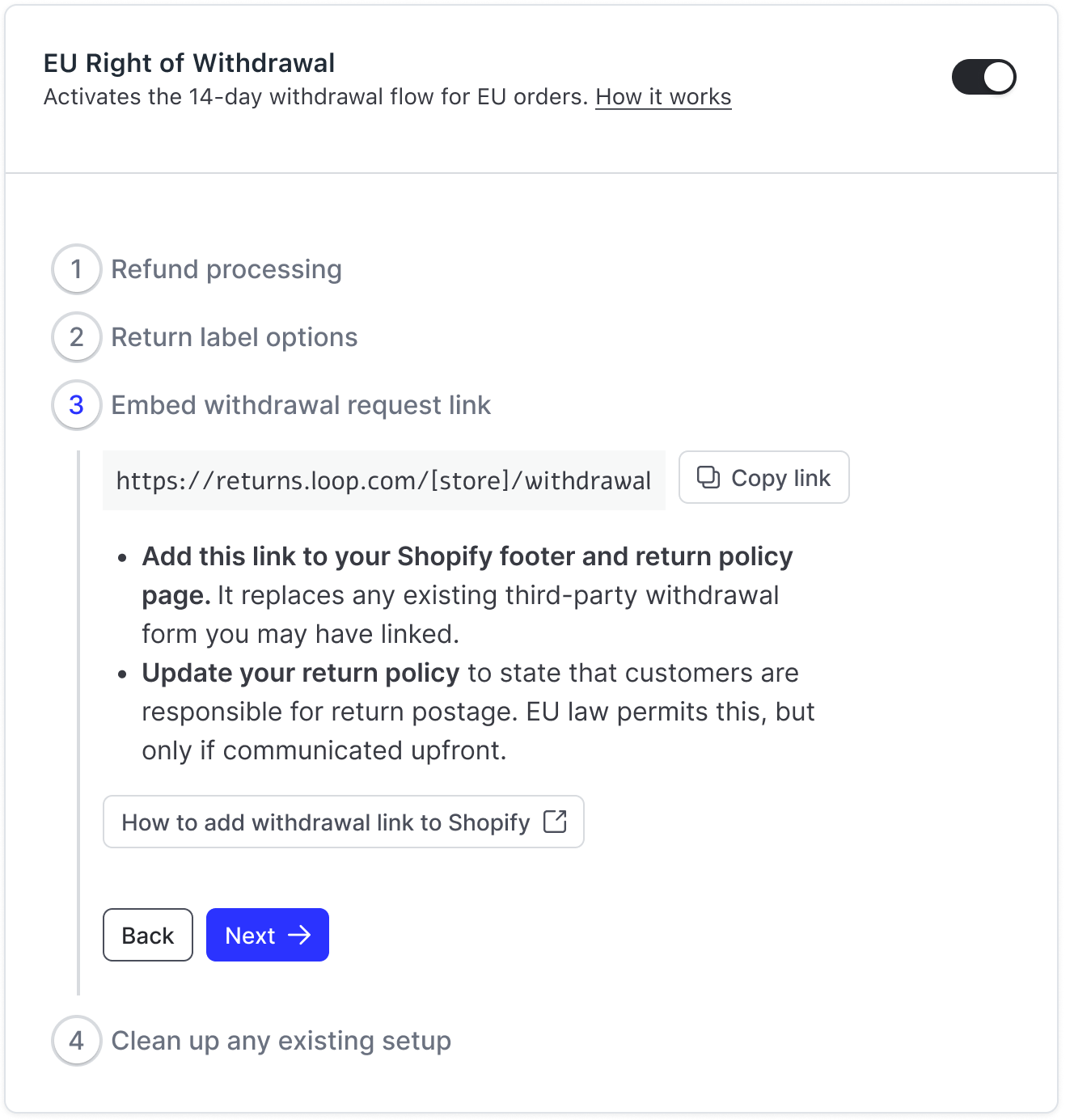
Copy your withdrawal link (shown in this step, in the format https://[your-store].loopreturns.com/#/withdrawal) using Copy link, then:
Add this link to your Shopify footer and return policy page. It replaces any existing third-party withdrawal form you may have linked.
Update your return policy to state that customers are responsible for return postage. EU law permits this, but only if communicated upfront.
For step-by-step placement instructions, click How to add withdrawal link to Shopify in the admin, or see Adding your withdrawal link to your storefront below. Click Next.
Important: Keep the link accessible throughout the shopper's 14-day window (for example, a persistent footer link). This is what satisfies the "easy-to-find" withdrawal button requirement.
Adding your withdrawal link to your storefront
Your withdrawal link is the URL shown in Step 2 of the setup flow (format: https://[your-store].loopreturns.com/#/withdrawal). Add it where shoppers can easily find it and keep it accessible throughout the 14-day window - most commonly your storefront footer and your return policy page.
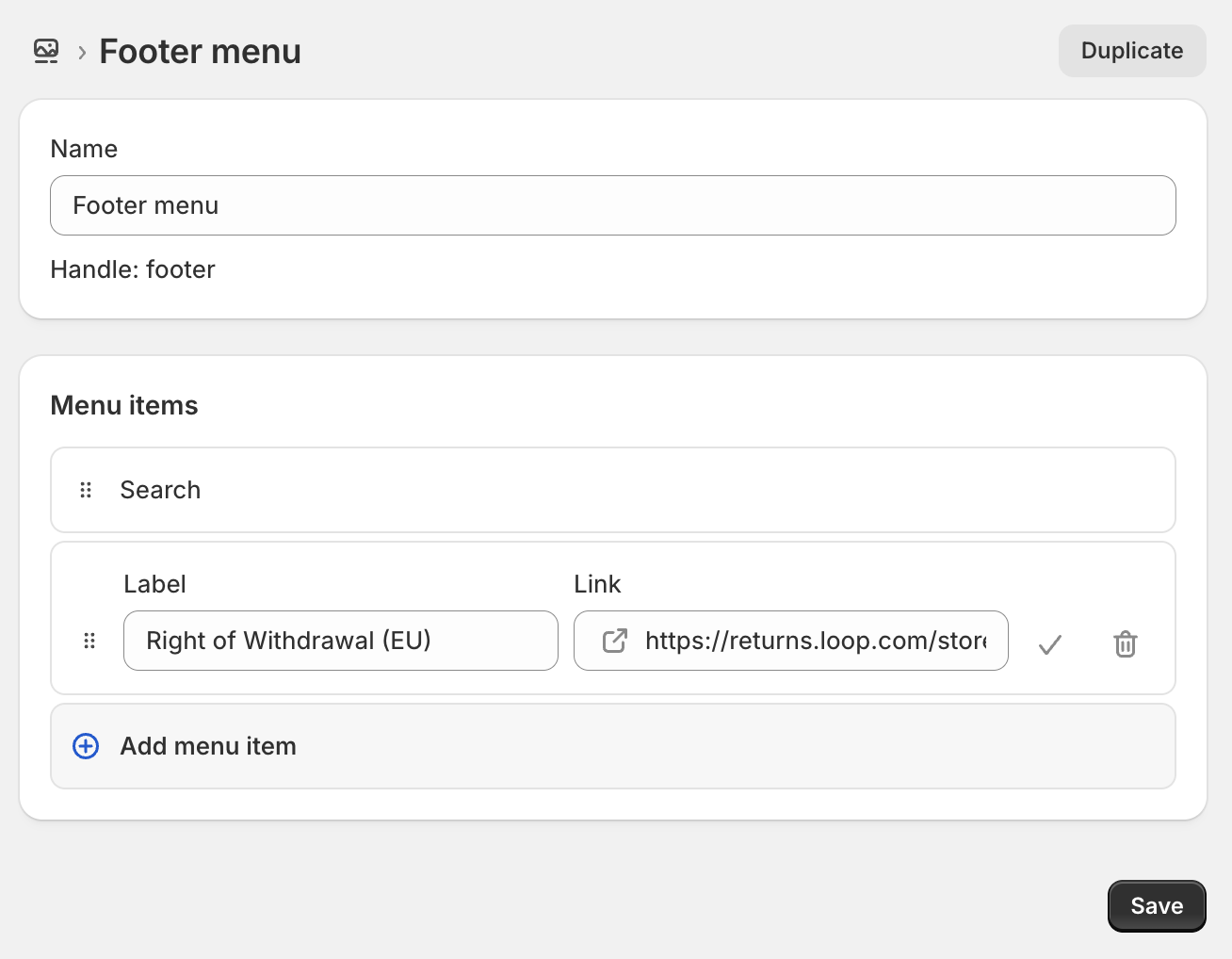
To add the link to your Shopify footer menu:
In your Shopify admin, go to Content > Menus.
Open your Footer menu, or click Add menu to create one.
Click Add menu item, give it a clear label (for example, "Cancel your order (EU)" or "Right of Withdrawal"), and paste your withdrawal URL in the Link field.
Click Add, then Save menu.
If the menu isn't already attached to your footer, go to Online Store > Themes > Customize, select Footer, add a Menu block, and choose your footer menu. Click Save.
You can also add the same link to your return policy page so it's available wherever shoppers look for it.
Step 4: Clean up existing setup
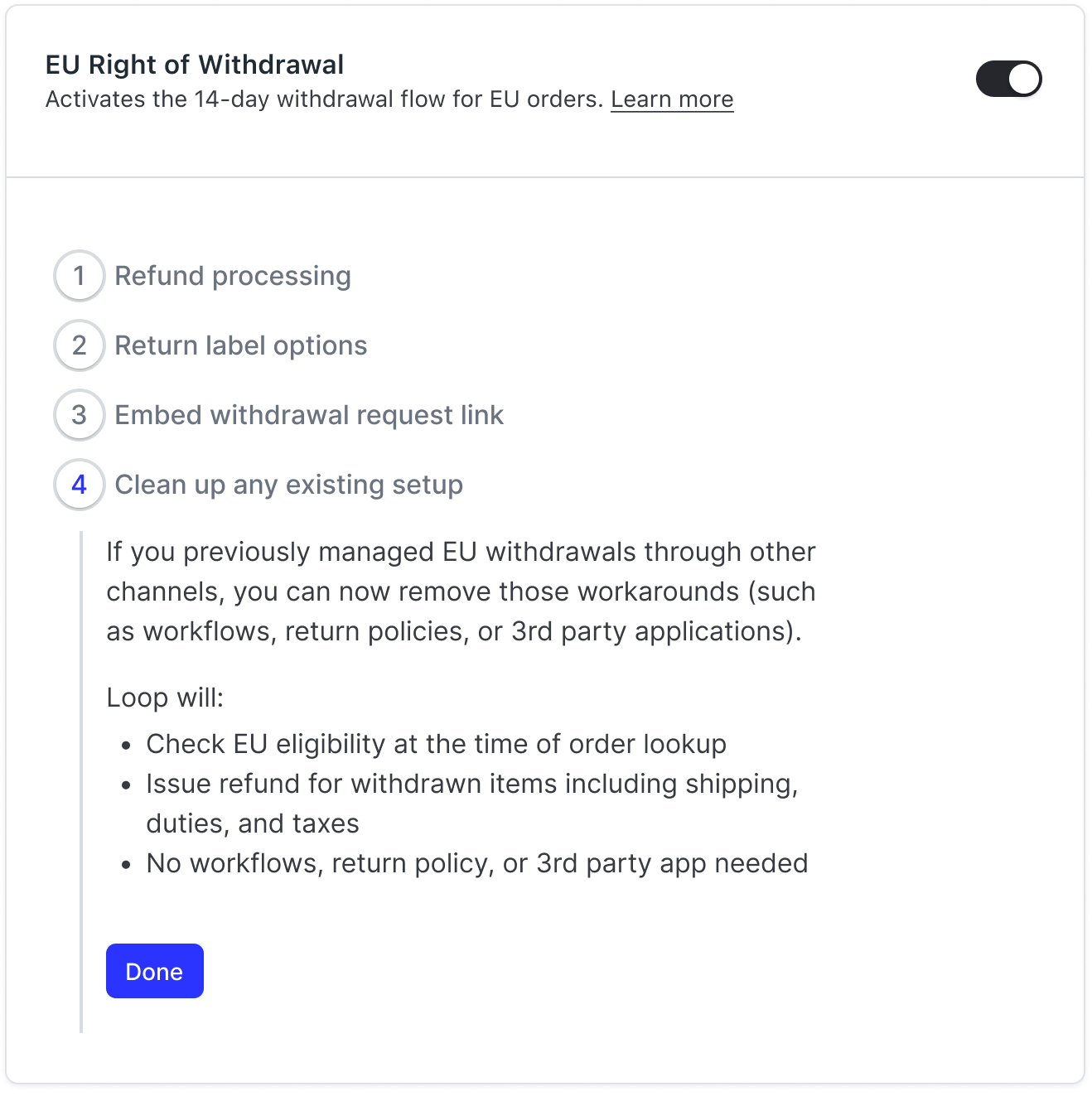
If you previously managed EU withdrawals through other channels, you can now remove those workarounds (such as workflows, return policies, or any 3rd party apps). For the exact settings to reverse, see EU Right of Withdrawal: Manual Configuration (legacy).
Once the native flow is on, Loop will:
Check EU eligibility at the time of order lookup
Handle eligible EU withdrawals with no workflows, return policy, or 3rd party app needed
Click Done.
Important: Don't remove your existing workaround until the native flow is confirmed enabled on your store, so there's no gap in coverage.
Setup: Manual configuration (legacy)
Note: Loop's native EU Withdrawal flow is strongly recommended. The manual configuration steps have moved to their own article: EU Right of Withdrawal: Manual Configuration (legacy). Use it only if the native flow isn't available to you (for example, non-Shopify merchants, or stores not yet enabled).
Checkout+ and the EU cooling period
Checkout+ (CO+) is Loop's order protection product that lets shoppers pay a small fee at checkout in exchange for a discounted return label. A common question from EU merchants is whether the Checkout+ fee conflicts with the right to a free return within the cooling period.
The short answer: Checkout+ is compliant as-is.
The directive states shoppers are responsible for return postage within the cooling-off period, unless the seller has offered to cover it or failed to disclose this upfront. Checkout+ doesn't remove the right to return - it changes how much postage the shopper pays depending on whether they pre-paid the fee. In both cases, the right to return within 14 days is fully preserved.
Note: One edge case: for defective product returns, EU law shifts return shipping costs to the merchant, and any Checkout+ fee paid should also be refunded. The handling fee can be waived via a Workflow (see manual Step 3), but this applies broadly to all shoppers matching the condition - not only CO+ purchasers. The Checkout+ coverage fee itself must be refunded manually in Shopify.
Checkout+ settings are configured in Returns management > Policy settings > Checkout+.
FAQ
Is there a list of EU and EFTA markets?
Yes - see this link.
Do I need to configure anything to use the native EU Withdrawal Flow?
Very little. Turn on the setting in General Settings, choose your refund-processing mode and your return-label option (Loop-generated or customer-provided), and link to your /withdrawal page on your storefront. Loop enforces the 14-day window and issues the refund — item value, shipping, duties, and taxes, less any Loop-generated label cost — automatically. The native flow is Shopify-only in V1 and rolling out progressively, so it may not be enabled on your store yet.
A shopper or partner is asking for our "withdraw link" - what do I provide?
If the native flow is enabled, provide your Loop withdrawal URL (shown in your setup flow), kept accessible throughout the 14-day window. If you're using the manual fallback, provide the link to your storefront withdrawal button (see manual Step 4).
A merchant told me the law requires a "one-click" free return label outside the Loop portal - is that true?
Not quite - these are two separate ideas. There is no requirement for an automated return label or one-click refund. There is (from 19 June 2026) a requirement for an automated withdrawal function - the button, two-step confirmation, and confirmation email - which logs the shopper's intent to withdraw. Loop's native EU Withdrawal Flow provides this function for Shopify merchants; without it, you provide it via a withdrawal-button app or custom form. The function logs intent - it does not generate a label.
Can I tell shoppers and partners that "Loop supports the EU Right of Withdrawal"?
For Shopify merchants on the native EU Withdrawal Flow, Loop provides the withdrawal function and handles the 14-day window and full refund natively. Loop's settings also support the return-and-refund requirements via manual configuration. EU compliance is ultimately the merchant's responsibility - Loop recommends reviewing your full obligations with a legal professional before making representations about your compliance status.
Does the EU cooling period apply to all products in my catalog?
No. The right of withdrawal has exceptions and does not apply to personalised or made-to-order goods, perishable items, sealed software or DVDs that have been unsealed, digital content already downloaded (if consented at purchase), or services already fully delivered. Note: in the native flow's V1, all items are technically eligible for withdrawal (item-level exclusions are coming in a future phase). Standard apparel, footwear, accessories, and most physical goods are covered. If unsure about specific SKUs, consult a legal professional.
What does the customer get refunded?
The full value of the withdrawn items, plus original shipping, duties, and taxes. If you use Loop-generated labels, the return-label cost is deducted from that amount — the shopper is responsible for return postage, which EU law permits as long as it's disclosed upfront. If the shopper provides their own label, nothing is deducted (they pay their carrier directly). In V1, if a shopper paid for upgraded or expedited shipping, the full shipping amount is refunded.
Do I have to provide a return label?
That's your choice. When you set up the native flow, you pick either Provide a prepaid label (Loop creates the label and deducts the estimated cost from the refund) or Customer provides their own label (the shopper gets your return address and ships the item back themselves). See Return labels.
Can I use my third-party label provider or multiple return labels for withdrawals?
Not today. The withdrawal flow supports only a single Loop-generated label or a customer-provided label. Third-party / external label connectors and multi-label returns are not supported for withdrawals, even if you use them for your standard EU return policies. This is worth noting if you're an EMEA merchant running external label connectors or country-/carrier-specific policies — those configurations don't apply to the withdrawal path.
What happens if the return label costs more than the item?
With Loop-generated labels, if the estimated label cost is greater than the value of the returned items, Loop automatically falls back to the customer-provided-label experience for that withdrawal — the shopper sees your return address and shipping instructions and ships the item back at their own cost. This is automatic and there's no separate merchant notification today. Configuring an in-region EU return destination keeps label costs down and makes this less likely.
Will I see withdrawals in my dashboard?
Yes. With the native flow, withdrawals appear in your Returns dashboard alongside standard returns, marked with a dedicated withdrawal icon.
What happens if the order hasn't shipped yet?
In the native flow, if the entire order is unfulfilled, Loop cancels it outright. For split fulfillments, shipped items go through the withdrawal flow and unfulfilled items are frozen so they aren't shipped.
Do I need a separate return policy for EU shoppers?
With the native flow enabled, the withdrawal path operates independently of your return policies, so no separate policy is required for it. If you're using the manual fallback and your global policy already meets the EU requirements (14+ day window from delivery, Refund enabled, outbound shipping refundable), you don't need a separate one; otherwise create a separate EU policy and use the Order location workflow condition.
Can I still charge a return fee on EU orders within the 14-day window?
Within the 14-day cooling period, you generally cannot charge a fee against the refund itself - the shopper must receive their full product cost plus the standard outbound delivery charge. You can require the shopper to pay return postage (unless you've offered to cover it or failed to disclose upfront). After the 14-day window, standard return fees apply.
Does this apply to EFTA markets like Norway?
Yes. The EU Consumer Rights Directive is incorporated into the EEA Agreement, so the right of withdrawal applies in Norway, Iceland, and Liechtenstein.
What about the UK?
The new EU 2023/2673 withdrawal button requirement is an EU/EEA measure - confirm current UK-specific requirements with your legal advisor.
Does this apply to exchanges and store credit?
The right of withdrawal requires that a full cash refund is available. You can offer exchanges and store credit as additional options, but not as the only options within the 14-day window.
How do shoppers find the withdrawal flow?
Only through the link you place on your storefront. The withdrawal flow lives at a dedicated URL (your Loop returns URL with /withdrawal appended) and is not linked from your standard returns portal or order-status hub. There's no automatic "Start a withdrawal" button in the portal, so you decide where to surface the link — for example, your footer and return policy page.
What happens if an order is outside the 14-day window or wasn't shipped to a covered country?
Eligibility is checked when the shopper looks up their order, not before. A shopper can open the withdrawal page and enter their order details either way; if the order is past the 14-day window or wasn't sent to a covered EU/EFTA country, they'll see a message that it isn't eligible. The page also offers a button to start a standard return instead. Loop doesn't check both paths automatically.
What are my options for processing withdrawals?
Two. Immediate issues the refund as soon as the shopper submits the request. Manual lets you review each request and process it after the shopper ships the item back. Manual is useful if you expect high volume or want to confirm the item is on its way before refunding — you can wait until the item shows as in transit, up to 14 days from the request.
Do Workflows apply to withdrawals?
No. Workflows do not run on the withdrawal flow — it's a separate, stripped-down experience with no return reasons, outcomes, or workflow logic. Event-based withdrawal notifications are not available today.
Can I reject or deny a withdrawal?
In certain cases, yes. The shopper is expected to make a good-faith effort to send the item back — generally, showing the item is in transit, or having it delivered, within 14 days of the request. If they don't, you're not required to honor the withdrawal, and you can reject or cancel it from the processing dashboard. This is general guidance, not legal advice; the directive limits when you can decline, so confirm specifics with your legal team.
Can I customize the withdrawal page copy?
Yes. Most of the copy on the withdrawal page is customizable from the standard customizations page, and withdrawal instructions can differ from your standard return policy instructions. Not every element is editable.
How is the return address shown to the shopper determined?
Loop uses the order's normal return policy address, following the usual order of precedence: zone address, then catch-all, then default. If none is found, Loop falls back to the hidden withdrawal policy's address, and if that's empty too, your shop's default policy address. The first valid address wins.
Do my block lists or allow lists apply to the withdrawal flow?
No. Block lists and allow lists don't affect the withdrawal flow — the withdrawal path deliberately bypasses them. Because the right of withdrawal is a legal requirement you must honor, these lists are not applied to withdrawal requests.
What should I do before turning off my old EU setup?
Run a test withdrawal through the native flow to confirm it works end to end before you turn off or remove any previous settings (a third-party app, a temporary EU policy, or Workflows). That way there's no gap in coverage during the switch.
Do I control when shoppers use the withdrawal flow?
Yes. You decide when and where to route shoppers to the withdrawal flow — it only appears where you place the withdrawal link — and you can enable or disable the EU Right of Withdrawal setting yourself in Returns management > Policy settings > General. Keep in mind the flow exists to meet a legal requirement, so factor compliance into any decision to turn it off.
My return window override workflow isn't working - what should I check?
Return Window actions in Workflows work most reliably with Order Tag conditions. If you're using a date- or product-based condition to extend or change a return window, it may not evaluate in time. Apply an Order Tag to the relevant orders (e.g., via Shopify Flow) and target that tag instead.
Please reach out to support@loopreturns.com with any additional questions.